Use the choices Steam actually shows
Randwerk changed graphics API behavior in 0.9.7 and again in 0.9.8. The later post includes this launch dialog. Its labels direct players with crashes toward DX12 and AMD GPU users toward Vulkan.
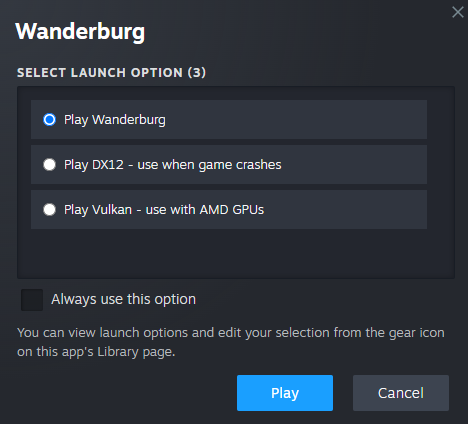
Image: Randwerk’s 0.9.8 announcement. The wording and available choices can change in later versions.
Start the game from your Steam Library and use the launch-choice dialog when it appears. If Steam remembers a previous choice, the official image says you can edit that selection from the gear icon on the app’s Library page.
Do not paste the option’s label into a custom launch-command field. The announcement provides a selection interface, not literal flags such as a made-up --vulkan command.
Try one change and keep a baseline
- Note your installed patch and whether the failure happens before the menu or during a particular run.
- Close the failed game normally and make one test with the default option, if it is safe and practical to reproduce.
- Try the alternative indicated by the official dialog for your symptom or GPU. Keep the other settings the same.
- Record whether it reaches the menu, starts a run and reproduces the original failure. A successful menu launch alone does not verify a mid-run crash is fixed.
- If an alternative performs worse, return to the previous choice. Keep the results for a report rather than changing several unrelated options at once.
We have not tested these choices on your hardware. The official Steam store currently lists Windows support; a macOS launch problem cannot be diagnosed as a supported Windows installation from these notes alone.
Separate a crash from a freeze
The 0.9.8 update added safeguards for an Agent 0 health issue and a Spider loadout freeze, and explicitly asked affected players to test them. That wording is evidence of a targeted fix attempt, not proof that every similar symptom disappeared.
Later updates improved idle performance in 0.9.13, and menu, leaderboard and map-generation robustness in 0.9.14. A failure during a loadout selection may need different evidence from a process that exits immediately at startup.
Make the remaining problem reproducible
Keep a short record: patch, operating system, GPU, chosen launch option, the last visible screen, and the minimum steps that trigger the problem. Include the time of the failure and any error message visible to you. Share only the necessary details through the developer’s existing support route; review logs for private paths or account information first.
Avoid downloading an unofficial “fix,” disabling operating-system protections, or removing your save based on an unverified comment. None of the official notes linked here requires those steps.
If the game launches and your issue is driving or Nitro recovery, continue with Controls and Nitro instead of repeatedly changing graphics APIs.
Sources
- Hotfix 0.9.8 and launch options · Randwerk · 2026-09-10
- Hotfix 0.9.7 · Randwerk · 2026-09-09
- Hotfix 0.9.13 · Randwerk · 2026-09-19
- Hotfix 0.9.14 · Randwerk · 2026-09-21
- Wanderburg on Steam · Official store
Our steps and comparisons are editorial guidance. Source verification does not mean these steps have been tested on every game setup.